Find what Google will flag before it costs you the account.
Polyntor scans your store, its policy pages and your product feed against Merchant Center rules, finds the reasons behind a suspension — misrepresentation, missing policies, prices that do not match — and tells you what to fix before you appeal.
Three views of your store, one account
Run them separately or together. Each one answers a different question Google asks about your store.
Site scan
Nine sections of your store checked the way a reviewer opens them: returns, shipping, contact, checkout, prices.
- Returns and refund policy
- Shipping and delivery terms
- Contact details and business identity
- Broken links and technical checks
Suspension risk and action plan
One verdict from the site and the feed together, with the fixes in the order that matters.
- Risk level: low, medium or high, and what it came from
- Every finding names the page and the rule behind it
- Fix instructions in plain language
- PDF and JSON export, and the appeal report, on Pro
Feed scan
Each product in your feed compared with the page it links to, attribute by attribute.
- Attributes, identifiers, prices and currencies in the file
- Price, availability and title against the live page
- Product image checks on Pro
- Upload a file, or connect a feed URL or a Google Sheet
- Or connect your Merchant Center account: its issues, product statuses and products as the feed, on Pro
What the site scan checks
Nine sections, the ones a Merchant Center reviewer opens first — and where most misrepresentation suspensions come from. Each one is read from your live pages, not from a form you fill in.
- RT01Returns and refunds
The policy exists, is linked, and says the window, the conditions and who pays for shipping back.
- SH02Shipping
Costs, regions and delivery times are stated, and the same on every page that mentions them.
- CT03Contact
A real way to reach you: address, email, phone or a form that works, on a page Google can find.
- PV04Privacy policy
Present, reachable, and covering what a store collects at checkout.
- TC05Terms and conditions
The rules of the sale, findable from the footer and the checkout.
- PR06Product pages
Price, availability and identity are consistent, and nothing promises what the page cannot deliver.
- FT07Footer
The links a reviewer expects — policies, contact, business identity — are there and not broken.
- AB08About us
Who is selling, from where, and that it matches the rest of the site.
- MC09Merchant Center account readiness
The account-level things Google checks: business name, domain, the pages it needs to verify you.
On top of the nine: the technical layer — HTTPS, indexability, broken links, blocked resources — and a comparison of the same facts across pages.
This is the report
Real screenshots from a real store scan. Every finding names the pages and the rule, and says what to change.
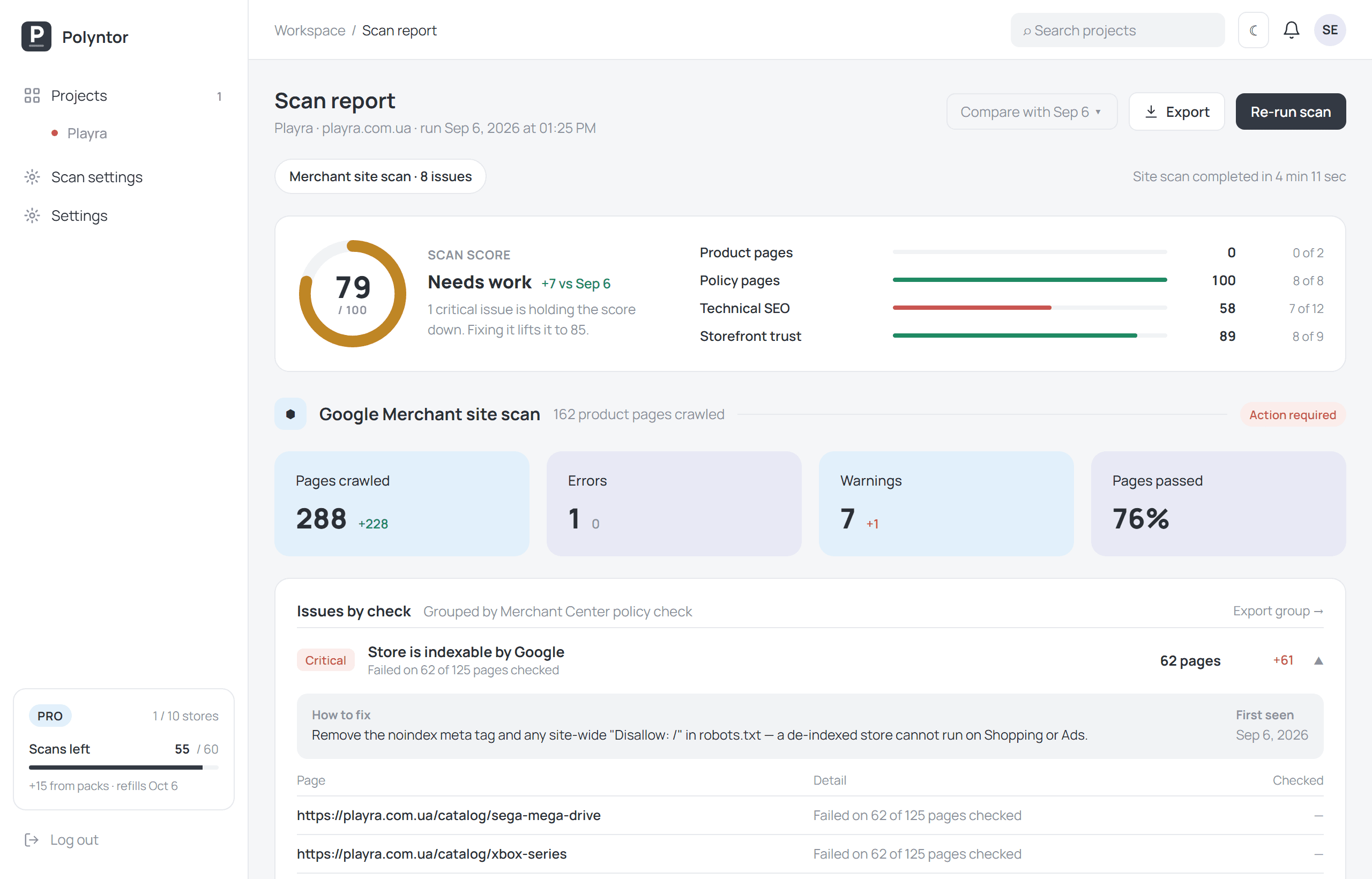
One score, and what is holding it down
The score, the four groups behind it, and the issues grouped by the Merchant Center check that failed — each with a fix and the pages it failed on.
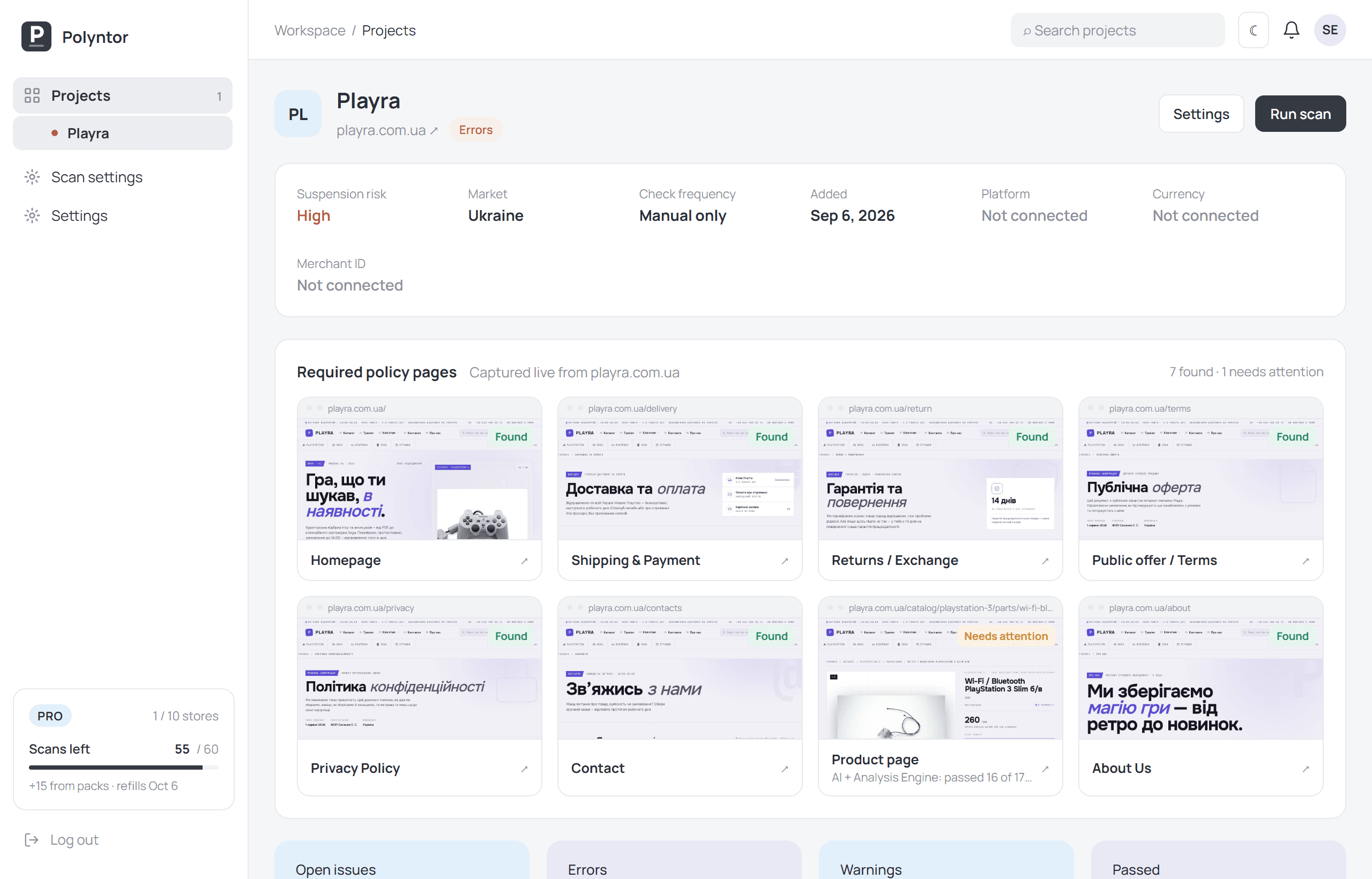
Every required page, captured as the crawler saw it
Returns, shipping, terms, privacy, contact, about — found or missing, with a screenshot you can attach to an appeal.
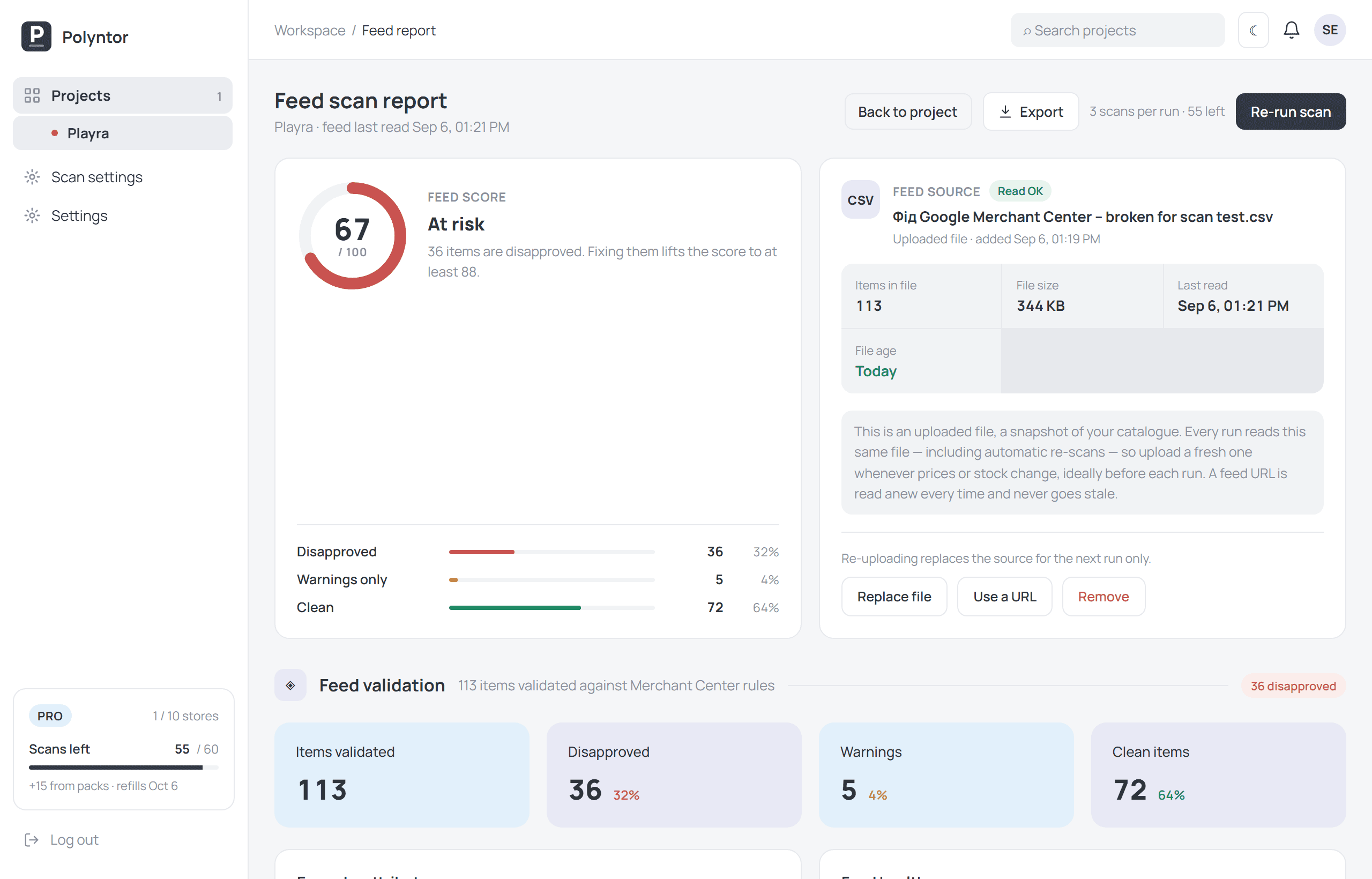
The feed, item by item
How many products would be disapproved and why, from the file itself and from each product page it links to.
How it works
Add your store
Paste the domain. Attach a product feed file or its address if you sell through Merchant Center.
We scan as Google does
The crawler visits your pages, captures every required policy page and reads the feed item by item.
Fix from the report
Every finding names the page, the rule behind it and the change that clears it. Export as PDF or as the appeal report on Pro.
The feed scan, layer by layer
Upload the file, connect a feed URL or a Google Sheet. Three layers run over it, each answering a question Google asks about your products.
The file
- Required attributes present and well-formed
- GTIN, MPN and brand: present, valid, not reused
- Prices with a currency, availability with a value Google accepts
- Links that resolve, images that exist
Every product page
- The price on the page is the price in the feed
- In stock in the feed means in stock on the page
- The title describes the same product
- The page opens, without a redirect to somewhere else
The images
- Resolution and format Google accepts
- No watermarks, promotional text or overlays
- The picture shows the product, not a placeholder
- A sample is judged by the model, the rest by rules
Free lists one failing item in ten from the file rules and counts the rest; Advanced lists one in three and adds the page comparison; Pro lists them all. A feed scan costs 3 scans from your monthly allowance.
Monitoring, so a suspension does not come as a surprise
On Pro, each store re-scans itself on a schedule you set — the site, the feed, or both — and emails you only when something changed for the worse.
One switch per store, one scan from your allowance per run. Off until you turn it on.
The first run sets the baseline. After that you hear from us only when the suspension risk goes up.
A store that is down is a store Google cannot review. We check twice before we write.
Every run is kept, so a fix shows up as fixed and a regression as a regression.
A feed uploaded as a file is a snapshot: upload a fresh one before each run, or connect a URL and it stays current on its own.
A report you can act on, not a list of warnings.
Findings grouped by the check that failed, with the affected pages and items listed underneath. The appeal report puts them in the order a Merchant Center reviewer reads.
- 01Scan score and suspension risk
One verdict, and what it was calculated from
- 02Failed checks with evidence
Screenshots of the pages the way the crawler saw them
- 03Feed items with errors
Price, availability and title against the live page; identifiers and attributes from the file
- 04Appeal-ready export
PDF and the appeal report, structured for a reviewer — on Pro
Pricing
Start free. Upgrade when you need the whole report or the whole feed.
One store, and enough of the report to see whether there is a problem.
- 1 of 9 report sections in full
- Score and suspension risk
- Feed scan: file rules, 1 in 10 failing items listed
- 4 scans a month
- 1 store
The whole report, and the feed compared with your pages.
- All 9 sections, fix instructions and the action plan
- Feed scan: file rules and page comparison, 1 in 3 failing items listed
- 25 scans a month, 5 stores
- CSV export, extra scan packs
Everything, plus monitoring and the full feed.
- Full feed scan with product image checks
- Merchant Center connection: Google’s own account issues and required settings, read daily
- Automatic re-scans — daily, weekly or monthly — with email alerts
- 60 scans a month, 10 stores
- PDF and JSON export, and the appeal report
- Every new feature as it ships — Pro only
VAT added at checkout · cancel any time · secure payment by Paddle
Plans, side by side
The same table the app shows at checkout.
| What you get | Free | Advanced | Pro |
|---|---|---|---|
| AI compliance analysis on every scan | ✓ | ✓ | ✓ |
| Report sections unlocked | 1 of 9 | All 9 | All 9 |
| Fix instructions and action plan | Unlocked section only | Full | Full |
| Site pages per scan | 100 | 2,000 | 10,000 |
| Product pages per scan | 10 | 1,000 | 10,000 |
| Broken link check | ✓ | ✓ | ✓ |
| Screenshots of the required policy pages | ✓ | ✓ | ✓ |
| Stores | 1 | 5 | 10 |
| On-demand scans a month | 4 | 25 | 60 |
| Merchant feed scan | 1 in 10 failing items listed | 1 in 3 failing items listed | All items |
| Attributes, identifiers, prices and links in the file | 1 in 10 listed | 1 in 3 listed | All listed |
| Each item compared with its store page | — | 1 in 3 listed | All listed |
| Product image checks | — | — | ✓ |
| Feed sources | File, URL or Google Sheet | File, URL or Google Sheet | File, URL or Google Sheet |
| Cost per feed scan | 3 scans | 3 scans | 3 scans |
| Automatic re-scans, site and feed | — | — | Daily, weekly or monthly · 1 scan per run |
| Email alerts on rising risk or an outage | — | — | ✓ |
| Change history between scans | — | ✓ | ✓ |
| Report export | — | CSV | CSV + JSON + PDF |
| Merchant Center appeal report | — | — | ✓ |
| Merchant Center connection | — | — | ✓ |
| Account issues, product statuses, required settings | — | — | Read daily |
| Business info, shipping and returns filled from the account | — | — | ✓ |
| New features as they ship | — | — | ✓ |
| Extra scan packs, never expire | — | $10 for 10 scans | $10 for 15 scans |
Questions
Do I have to install anything?
No. The scan runs from our side over your public pages, exactly like Google’s crawler. Nothing is added to your site.
My Merchant Center account is suspended. Will this get it reinstated?
Polyntor finds and documents the violations behind a suspension — misrepresentation is the usual one — and builds the appeal report. The decision stays with Google — we do not appeal for you and cannot promise an outcome.
Which platforms are supported?
Any site we can reach: Shopify, WooCommerce, Magento, PrestaShop or custom. Feeds are read as XML, CSV, TSV or a Google Sheets link.
What does the free plan include?
One of the nine sections in full, the issue counts for the other eight, the score, and the feed checked against the file rules with one failing item in ten listed — enough to see whether you have a problem. The whole report and the whole feed are on the paid plans.
How long does a scan take?
A site scan takes a few minutes — a store with a few hundred pages finished in about four in our tests. A feed scan depends on how many products it has to open; a hundred items is a couple of minutes.
What counts as a scan?
One site scan is one scan. One feed scan is three, because it opens every product page. Automatic re-scans cost one scan each. Scans you do not use in a month do not carry over; scans from packs never expire.
Do you need access to my Merchant Center account?
Not for the scan: everything is read from your public store and from the feed you give us — the same things Google reads. On Pro you can also connect your Merchant Center account through Google’s own consent screen, and the account’s issues, product statuses and required settings are read daily and shown beside the scan. Read-only, and you can disconnect and revoke the access at any time.
What happens to my data?
Your pages, screenshots and feed items are kept so you can compare runs, and deleted with your account in one step. Parts of pages go to an AI provider for analysis under terms that forbid training on them. The full list of what is kept, and who processes it, is in the Privacy Policy.
Can I cancel? Do you refund?
Cancel any time from Settings; the paid period runs to its end and is not charged again. A scan that could not run — the store did not answer, the feed could not be read — is refunded to your allowance automatically. Payments are handled by Paddle, our merchant of record, who issue the invoice.
Ready to check your store?
The first scans are free and take a few minutes. Already have an account? Pick up where your last scan left off.